Description
I present to you the most powerful Mp3 Tagger Plugin. With this plugin, you can change metadata and add voice anywhere.
The plugin has two sections: private and public. In summary, in the private section, you can add tags directly in posts while the public section allows you to make the tagger available for the public to use. The private section has slightly more features.
PRIVATE SECTION.
This section has the most features.
1. First, go to MP3 Tagger Advanced and fill the fields with your voice tag url, covert art url, etc.


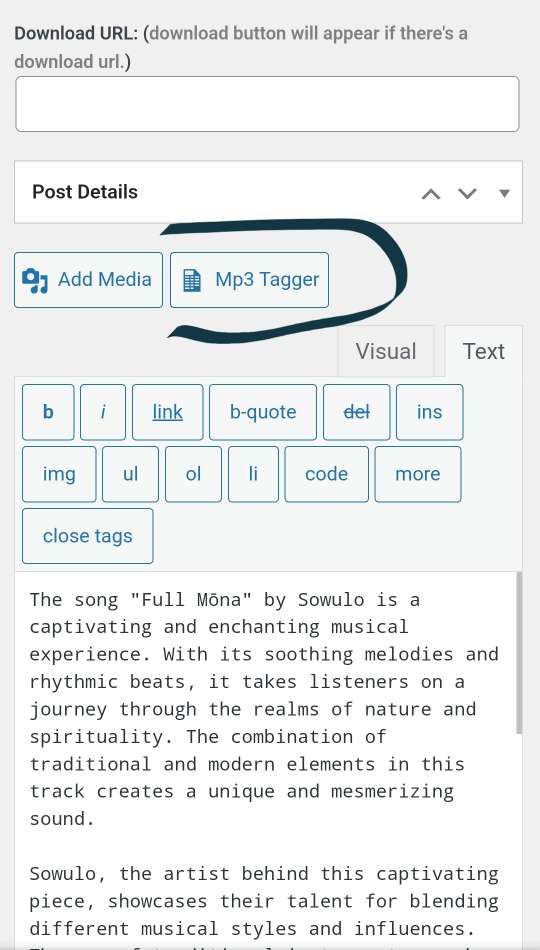
2. Now, go to post or edit the post and click the Mp3 Tagger button. See screenshot.

3. Fill the fields. If you want to add a voice tag, click the voice tab link.

4. Now select voice tag. You can select none, which will change only the metadata and cover art. If you want to add voice, you can virtually anywhere. Beginning, middle, ending, beginning & ending, beginning, middle, and ending, custom.. In custom, just put the number of seconds the mp3 must have played before the voice note can play. There are 3 custom options. Making it very flexible and versatile.

REQUIREMENTS
This plugin won’t work if the following requirements are not met.
1. Php version 7.4 or higher.
2. Ffmpeg v4.2.7 or 4.4.2 + (tested 4.2.7 and 4.4.2)
3. FFmpeg should be executable.
SETTING UP FFMPEG FEE: If your host supports ffmpeg and its execution, then everything should work fine. If you want me to help with the setup (provided your server supports it), it’ll cost 15k naira.
FILE STORAGE: Private section files are stored in WordPress media library while that of the public section is stored in the plugin’s uploads and uploads-img folders.
Reviews
There are no reviews yet.